
Maybe. There are lots of rumors flying about but thinking about it wouldn't surprise me that much. It's complex, data hungry (meaning it works best when you have vast archives of stuff) and a little hard to get your head around. I know of only 4 places that actually use Final Cut Server (...not own it, or just installed it to test it out...but actually use it and rely on it daily).
My experience could be lacking though. It's hard to get reliable numbers on units sold et al.. but it's all just rumors anyway. I think Final Cut Server is pretty cool but its usefulness is limited to larger clients in my experience.
Tuesday, January 18, 2011


Monday, December 27, 2010
QuickTime Pro's "Conform aperture to" setting
In case you're not quite confused enough Apple has updated it's knowledge base article on QuickTime Pro's Conform Aperture To setting.
- Clean: The recommended setting for most video. Crops the video to the area of frame free from digitization artifacts and applies pixel aspect ratio correction. A 4:3 DV NTSC track appears as 640 x 480; a 16:9 DV NTSC track appears as 853 x 480.
- Production: Used for video production. Shows all pixels in the the video including the edges and corrects for pixel aspect ratio. A 4:3 DV NTSC track appears as 654 x 480; a 16:9 DV NTSC track appears as 873 x 480."
Got that?
Clean 16:9 DV NTSC is 853x480 while Production's is 873x480. Likewise Clean's 4:3 DV NTSC is 640x480 while Production is 654x480.
There. Hopefully you're a little more confused than before. I get confused over this stuff all the time. Don't even start thinking about what happens when a client plays these with something other than QuickTime Pro...just...don't. And don't think about Square vs non-square pixels either. Seriously. Don't.
Wednesday, December 22, 2010
Clients & Codecs
When your assistant sends off "master" exports to your client make sure that the client can actually play them so you don't get a call at 5:30pm that the video "won't play". And by that I mean explain to your assistant that FCP will export (Export QuickTime Movie) at the codec (yeah yeah I know) it was originally ingested as.
So, for example, if you've shot or ingested something that's DVCPROHD it's likely the client won't have that if they don't have FCP installed. And no, it's not really the best idea to send them a copy of the codec for legal reasons and because many client's I've worked with won't have that kind of access to their machine since IT people love to lock non-IT people out of everything that's actually useful on their computers so you'll end up wasting time trying to sort that out then discover they don't have Admin access.
So a tip: Export your masters in a codec that the client has that they can use and view. Animation, ProRes, Apple Lossless, etc...stuff that they're likely to have by default.
Also, keep in mind what they'll need if they need to do more than just watch. If it's just an approval copy go with H.264, it's small and looks great. If they're on a Windows Box I'd still go with H.264 (seriously, .wmv? No. .avi is dead, although I do like a good .mkv).
If they need to transcode it (ie...it's been approved) to DVD or something send them an Animation or ProRes so they can do with it as they see fit.
So, for example, if you've shot or ingested something that's DVCPROHD it's likely the client won't have that if they don't have FCP installed. And no, it's not really the best idea to send them a copy of the codec for legal reasons and because many client's I've worked with won't have that kind of access to their machine since IT people love to lock non-IT people out of everything that's actually useful on their computers so you'll end up wasting time trying to sort that out then discover they don't have Admin access.
So a tip: Export your masters in a codec that the client has that they can use and view. Animation, ProRes, Apple Lossless, etc...stuff that they're likely to have by default.
Also, keep in mind what they'll need if they need to do more than just watch. If it's just an approval copy go with H.264, it's small and looks great. If they're on a Windows Box I'd still go with H.264 (seriously, .wmv? No. .avi is dead, although I do like a good .mkv).
If they need to transcode it (ie...it's been approved) to DVD or something send them an Animation or ProRes so they can do with it as they see fit.
Friday, December 17, 2010
The Hidden "H" 50% Key
Here's one I'll bet few people know.
Place your cursor over either the Viewer or the Canvas then hold down the H key.
You should see the Viewer or Canvas pop out at 50% size no matter what it was originally set to. Why? I dunno, it's probably some function or preference or something I've missed all these years. But it's pretty cool nonetheless and could be handy since 50% gives a clearer representation of your footage than odd numbered percentages, although 50% won't reveal interlacing as 100% does. Man I'm up late.
Place your cursor over either the Viewer or the Canvas then hold down the H key.
You should see the Viewer or Canvas pop out at 50% size no matter what it was originally set to. Why? I dunno, it's probably some function or preference or something I've missed all these years. But it's pretty cool nonetheless and could be handy since 50% gives a clearer representation of your footage than odd numbered percentages, although 50% won't reveal interlacing as 100% does. Man I'm up late.
Thursday, December 16, 2010
iTunes, Gracenote and Client's Audio CDs
I get audio CD's from clients all the time which they've burned music or VO's or sound effects on to. The thing is unless you've told iTunes to:
A: Not launch when an audio CD in inserted.
B: Not to query Gracenote for CD/Track names
You'll end up with some pretty weird stuff as the name of the Disc and Track names. I find this pretty annoying which is why I've turned off all that stuff on iTunes here at the editing command center. But, when you are away from the Mothership and have to deal with this stuff you should be aware of what's happening.
Today, I was at a client's place and they decided rather than give me the audio cd they had in hand, one they burned off and quite likely the only copy, they decided they wanted to give me the tracks on a flash drive. Great! I love LOVE flash drives instead of optical discs. However...
When they handed it to me and I checked it right there and then on their computer the tracks were there, they played but there were named completely totally and bizarrely incorrectly. What had happened was that they had popped in the burned Audio CD, iTunes fired up, query'd Gracenote and decided it was someone's mix-tape CD (mix-CD?) from what was likely China. Whomever had made the CD originally, in fact, whomever had made the audio tracks, never named them I'm guessing.
Not a big issue if there's just a track or two but this audio CD had 40+ tracks of sound effects. The Finder had copied over the tracks as named by iTunes. I explained to them what happened, no, it's not a virus, no you haven't been hacked and no, they're not watching you on your webcam nor have they stolen your Facebook/Linkedin/Twitter/Whateverthehellsocialnetworkingcrapyouuse password (I should be as lucky). And you're right, I haven't "friended" you.
I told her I can't rename the tracks accurately. There are 40 of them and I don't know one from the other...yet.
So to fix this issue in the future I did a few things:
1. I hit Command + Comma in iTunes to bring up the Prefs.
2. Under General I unticked "Automatically retrieve CD track names from internet".
3. I went to username/Library/Preferences and deleted (emptied trash, my word was it full...had she ever emptied it?) "CD Info.cdib" which is where iTunes stores it's metadata on CD's it's looked up.
As an aside you can edit this file with something like BBEdit if you feel like it to remove the offending CD. You'll see a pattern to how they're listed but I wasn't in the mood and it was so large and Command + F (find) wasn't finding the misnamed names I didn't bother.
4. Eject the Audio CD.
5. Re-insert the Audio CD and saw that it was shown as "Audio CD" with "Track 01" etc...
6. Told her to (and showed her how) name the tracks what they needed to be named and to call me later. Yes, I'll leave the flash drive.
But what about the original audio files you ask? Surely they were named correctly? I imagine they would be if she could find them. I suspect they were in the trash I emptied. Go me!
A: Not launch when an audio CD in inserted.
B: Not to query Gracenote for CD/Track names
You'll end up with some pretty weird stuff as the name of the Disc and Track names. I find this pretty annoying which is why I've turned off all that stuff on iTunes here at the editing command center. But, when you are away from the Mothership and have to deal with this stuff you should be aware of what's happening.
Today, I was at a client's place and they decided rather than give me the audio cd they had in hand, one they burned off and quite likely the only copy, they decided they wanted to give me the tracks on a flash drive. Great! I love LOVE flash drives instead of optical discs. However...
When they handed it to me and I checked it right there and then on their computer the tracks were there, they played but there were named completely totally and bizarrely incorrectly. What had happened was that they had popped in the burned Audio CD, iTunes fired up, query'd Gracenote and decided it was someone's mix-tape CD (mix-CD?) from what was likely China. Whomever had made the CD originally, in fact, whomever had made the audio tracks, never named them I'm guessing.
Not a big issue if there's just a track or two but this audio CD had 40+ tracks of sound effects. The Finder had copied over the tracks as named by iTunes. I explained to them what happened, no, it's not a virus, no you haven't been hacked and no, they're not watching you on your webcam nor have they stolen your Facebook/Linkedin/Twitter/Whateverthehellsocialnetworkingcrapyouuse password (I should be as lucky). And you're right, I haven't "friended" you.
I told her I can't rename the tracks accurately. There are 40 of them and I don't know one from the other...yet.
So to fix this issue in the future I did a few things:
1. I hit Command + Comma in iTunes to bring up the Prefs.
2. Under General I unticked "Automatically retrieve CD track names from internet".
3. I went to username/Library/Preferences and deleted (emptied trash, my word was it full...had she ever emptied it?) "CD Info.cdib" which is where iTunes stores it's metadata on CD's it's looked up.
As an aside you can edit this file with something like BBEdit if you feel like it to remove the offending CD. You'll see a pattern to how they're listed but I wasn't in the mood and it was so large and Command + F (find) wasn't finding the misnamed names I didn't bother.
4. Eject the Audio CD.
5. Re-insert the Audio CD and saw that it was shown as "Audio CD" with "Track 01" etc...
6. Told her to (and showed her how) name the tracks what they needed to be named and to call me later. Yes, I'll leave the flash drive.
But what about the original audio files you ask? Surely they were named correctly? I imagine they would be if she could find them. I suspect they were in the trash I emptied. Go me!
Tuesday, December 14, 2010
Clients don't understand Container Formats

.mov, .mkv, .avi and others are containers which mean they're like sandwiches, I tell clients. (Did you see that? I began a sentence with a period, hah! Mrs. Roberts was wrong!) Not all sandwiches are good, and asking me for "a quicktime" or "an mov" or "an avi" is like asking me for "a sandwich on white bread". You've specified that you want a sandwich (video file), with white bread (container format) but you have yet to tell me what kind of sandwich you want (codec).
This seems to be the only way to get through to some clients. "You're ordering a sandwich with white bread but I don't know what kind of sandwich you want. PB&J? Mustard and Lettuce? Cheese and Anchovies?" "What do you recommend?" is usually their response. I dunno. What kind of sandwich does the thingy that you're going to play it on ask for? In the manual. Yes, that one, the one you didn't read.
Today I literally said to a particularly ornery client, "I need to know what you want between the bread, otherwise we're going to have to try a bunch and see which works and looks good." See, I'm making a video in an outdated format, using outdated software for a client's outdated hardware. This is the kinda fun that only a college education can provide, kids.
Things like H.264 solve this problem. They're PB&J sandwiches all the time. And something known as a "standard".
Thursday, December 9, 2010
Reduce AVI's skipping in VLC
During a break editing today a client decided to show me some of their past projects. They were encoded by someone at some point as .AVI's but they were skipping. While we were watching them she apologized and mentioned that all AVI's seem to skip for her.
So that got me curious and I played the same file with Movist which played back without skipping but I mentioned to her that Movist hasn't been updated for about 8 months so don't rely on it forever. However, the skipping problem was still bothering me in VLC. Checking her console logs I found mentions of first frame isn't a keyframe over and over aligning with the skipping. Not much to do about that as far as I know but there were some delay errors listed as well.
So delving into it's complex array of preferences I found the Caching Value which was set to 300ms. You can get there by hitting COMMAND + , (comma) in VLC and then clicking on the "All" radio button, Access Modules > File. Whew.
At the top you'll see "Caching value (ms)" and some number, likely 300. I just bumped it up to 1000 (1000 ms = 1 sec) and hit save.
The skipping is a lot better but there still is the occasional glitch as well as some very brief audio skips. I'm still not sure what can be done about them since Movist seems to handle the same file on the same hardware without issues. It may be some bug in VLC, I'm just not sure.
So that got me curious and I played the same file with Movist which played back without skipping but I mentioned to her that Movist hasn't been updated for about 8 months so don't rely on it forever. However, the skipping problem was still bothering me in VLC. Checking her console logs I found mentions of first frame isn't a keyframe over and over aligning with the skipping. Not much to do about that as far as I know but there were some delay errors listed as well.
So delving into it's complex array of preferences I found the Caching Value which was set to 300ms. You can get there by hitting COMMAND + , (comma) in VLC and then clicking on the "All" radio button, Access Modules > File. Whew.
At the top you'll see "Caching value (ms)" and some number, likely 300. I just bumped it up to 1000 (1000 ms = 1 sec) and hit save.
The skipping is a lot better but there still is the occasional glitch as well as some very brief audio skips. I'm still not sure what can be done about them since Movist seems to handle the same file on the same hardware without issues. It may be some bug in VLC, I'm just not sure.
Wednesday, December 8, 2010
Failure Rates of Solid State Drives
It's in French but this article has an interesting list of failure rates of SSDs (Solid State Drives). The translated version is here.
SSD's are really too young to really get a sense of their reliability in the long term but at least this is a start.
For the 2TB drives:
"- 9.71%: WD Caviar Black WD2001FASS
- 6.87% Hitachi Deskstar 7K2000
- 4.83%: WD Caviar Green WD20EARS
- 4.35% Seagate Barracuda LP
- 4.17%: Samsung EcoGreen F3
- 2.90%: WD Caviar Green WD20EADS"
SSD's are really too young to really get a sense of their reliability in the long term but at least this is a start.
For the 2TB drives:
"- 9.71%: WD Caviar Black WD2001FASS
- 6.87% Hitachi Deskstar 7K2000
- 4.83%: WD Caviar Green WD20EARS
- 4.35% Seagate Barracuda LP
- 4.17%: Samsung EcoGreen F3
- 2.90%: WD Caviar Green WD20EADS"
There is more info at the site.
Friday, November 26, 2010
Final Cut Studio $799 at B&H
B&H has Final Cut Studio for $799 if you're looking for a copy for that special someone.
Wednesday, November 24, 2010
Nvidia's GeForce GTX 595?
Hardmac has an interesting bit of info about a potential future graphics card.

They're calling it the GeForce GTX 595, but the real interesting thing is that the photo of it shows two Fermi GPUs on the board. If true, that'll be some considerable power for, as they mention, a future version of Final Cut Suite.
Combine that with the recent rumor of a Final Cut Studio update sometime around April 2011 and things start becoming interesting.
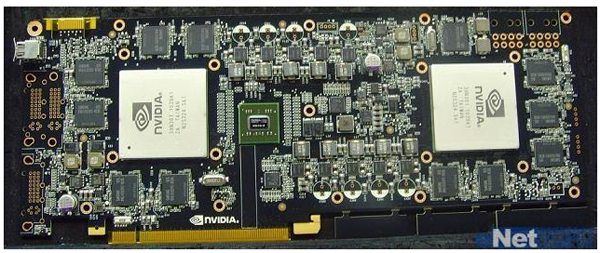
They're calling it the GeForce GTX 595, but the real interesting thing is that the photo of it shows two Fermi GPUs on the board. If true, that'll be some considerable power for, as they mention, a future version of Final Cut Suite.
Combine that with the recent rumor of a Final Cut Studio update sometime around April 2011 and things start becoming interesting.
Subscribe to:
Posts (Atom)


 Posts

