Wednesday, April 16, 2008

AudialHub


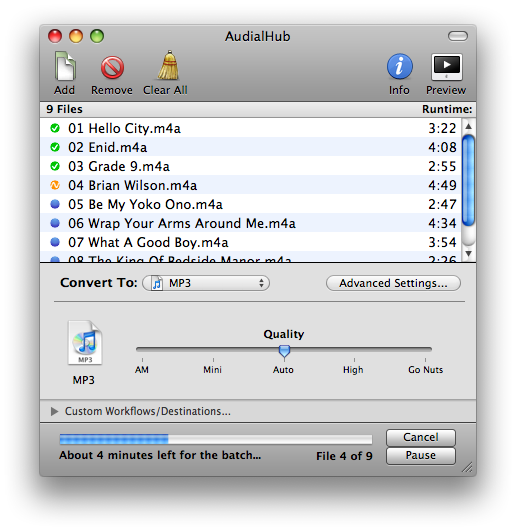
From the same company who make VisualHub comes their new audio conversion tool, AudialHub.

Conversion from dozens of audio types to popular formats like AAC, MP3, WMA, AIFF, WAV, Apple Lossless, 3G (cell phones), Ogg Vorbis, FLAC, and even Audio and MP3 CDs!
Audio tracks inside video files can also be converted!
Common tags (Artist, Album, etc) are automatically passed when applicable.
Up to 16 hours of audio can be converted to a single MP3 CD.
Easy-to-use Trim capabilities to narrow down short segments of audio.
Quick Preview capability to check out compression quality and Trim settings before a full conversion.
Dynamic file queue, allowing mid-conversion changes or additions, Pause/Resume, and an "always ready" Assembly Line Mode!
Run multiple simultaneous conversions in separate queues with separate settings.
Growl notifications, Dock progress indicator, and AppleScripting automation support!
Normalization, audio track selection, multiple decoder options, and direct access to add custom low-level command-line settings!
Detailed Users Guide and Help Center.


Even the price is funny: $18.81 alone or at a discount (if you bought VisualHub) of $14.41.

(btw, VisualHub was updated to v1.32 today)

FCP Manager is $99, Preference Manager, FCP Rescue are free

There's a fourth FCP pref manager app on the loose. This one is called "FCP Manager" from Reinphase Inc and it's $99. What's it do?

Save Final Cut Pro® preference & environmental settings as 'presets'
Launch new Final Cut Pro® projects using previously saved presets specific to users, formats, etc.
Efficiently manage preset files
Group multiple presets into folders
Add title, comments and user information to presets
Protect presets from accidental overwrites
Import/Export presets
Delete and restore Final Cut Pro® preference files
Intuitive and simple user interface


Compared against FCPResuce or Preference Manager which are free, this seems pretty steep to me. Even FCP Attic is only $15.

As "craigkabis" said at macupdate.com "Wow a hundred bucks! Can I have some of the crack you're smoking. $20 would be high for what this does."

Monday, April 14, 2008

Knowledge Base Updates

Apple released several updates to the FCS knowledge base the other day. I'm late, again :)

Final Cut Express: Deleting audio tracks
Final Cut Pro 6: About the Render All command
Final Cut Pro, Final Cut Express: Troubleshooting FireWire using direct connections
Final Cut Pro, Final Cut Express: Unexpected quit with Panasonic HDC-SD9 AVCHD
Final Cut Server: Changes made to browser headings do not appear in metadata
Final Cut Server: "Original media" appears in version comment field
Final Cut Server: Media in Final Cut Pro appear as "Media Offline" when using a Contentbase device for edit-in-place
Final Cut Server: Some Final Cut Pro projects may not always check out correctly
Final Cut Server: Support resources
Final Cut Server: Uploading and transcoding a file without a filename extension will stop the job
Final Cut Server: Windows client cannot copy files with filenames longer than 152 characters
Final Cut Studio: Kernel Panic with Kona 3 cards on Mac Pro

Artifacts and Fast User Switching


I've been editing on a friend's system for the past few days under a newly created account on their Mac. We've been using Fast User Switching a bit and I've noticed that if I leave FCP running on my login while my friend logs into their account, when switching back to my account sometimes, but not always, the Canvas will display heavy artifacts and skip considerably while playing something from the timeline. The footage was shot to a P2 card as DVCPro HD, 720 24p.

The odd thing is it's not consistent and I can't reproduce it every time at least so far. It may have something to do with this little-acknowledged Quicktime bug 7.4.5 but I'm not sure. Another report of this bug is here.

Friday, April 11, 2008

Phantom Cine QuickTime Toolkit 1.0.5 Update

If you're doing any high-speed video shooting/editing then you'll be happy to hear there is an update to the Phantom Cine toolkit.

Denser, faster, cheaper hard drives.

I'm not one to post youtube videos really but IBM's new technology dubbed "Racetrack Memory" could lead to more storage, fewer failures and faster access to data. Hopefully this will lead to smaller storage devices with less heat, less power consumption and faster access times for video editing.

Sleep your display with Keyboard Command


Try this:

Shift+Control+Eject. If it works your display will go to sleep as if you had turned it off while the Mac runs happily in the dark. Of course, just tap a key (I like Shift) to wake up the display.

Firmware update helps Firewire Problems?

Not only did Apple release another pro-app update today updating FCP to 6.0.3 but some sites are reporting that the recent iMac EFI Firmware update helps with Firewire volumes refusing to mount on some iMacs.

Tuesday, April 8, 2008

Keep an "AirDisk" spinning

If you use an "AirDisk" to keep shared data on but find it's spinning down annoying here's a really cool way to keep it spinning all the time.

I haven't tried it yet with other hard drives or shared volumes but this may be a solution for pesky external firewire hard drives with firmware which refuses to obey your energy saver settings and spin down no matter what.

Fastest Firewire Yet

Symwave which deals with firewire technology (among other things) announced today the fastest firewire yet.

It's called FirePHY-1600, and increases the speed of regular FireWire to about 1.6 gigabits per second (Gbps) in theory-ish which is twice as fast as FireWire 800.

The cool thing is that it's all backwards compatible with FireWire 800 and 400. And expect people to call it FireWire 1600 any second now. (don't get too comfy as FW3200 is on it's way already)

The true name of this technology is "IEEE 1394b S1600 Physical Layer (PHY)"

They're sending out samples to companies as I type this :)