Sunday, April 6, 2008

Multiple P2 Cards Mounted Simultaneously


I love P2 cards and cameras like the HVX-200. But here's a tip from Apple that has bitten me a few times and I never put the two together. Apparently when you have multiple P2 cards mounted at once the likelihood of Final Cut crashing is increased. Go figure. I wonder why Apple has chosen to just post a note about it rather than issue a patch for it.

On computers with Mac OS X 10.4, Final Cut Pro 6 may quit unexpectedly while you're using the Log and Transfer window to transfer media from Panasonic P2 cards. If you have multiple P2 volumes mounted simultaneously, the likelihood of this happening may increase.


So do this...

To work around this issue, have fewer P2 volumes mounted at a given time.


All the more reason to buy a few of these, I guess.

HDV Capturing Hassles

I've never liked HDV for many reason so here's one more straight from Apple:

When you capture footage from an HDV camera using Final Cut Pro, the image displayed in the capture window may lag slightly behind the image displayed on the camera. This is normal and does not indicate any issue with Final Cut Pro or your camera.


What do you do to solve this hassle? Nothing really...other than stop using HDV...

This inconsistency is related to HDV's Long-GOP (Group of Pictures) MPEG-2 format. With the data structure for this format, Final Cut Pro must assess information about several frames in a row before it can accurately display them all.

When you need to make decisions about where to place in and out points for clips you wish to capture, the time reference point on your camera is more accurate. However, with HDV it's a good idea to give yourself an extra second or so on each side of the clip when marking in and out points for Log and Capture or when using Capture Now.

Friday, April 4, 2008

AppFresh


There's a little freeware application for Mac OS X that's hard to come by on your own. It's called AppFresh and all it does is compare the versions of all of your installed applications with the ones listed on some common software download sites. What's funny is that this free software updating application isn't (generally) listed on the popular for-profit software update sites. Funny how that works, eh?

Anyway, check out AppFresh, it's free and can save you some time. I've already come to rely upon it for non-Apple updates overall. Because of AppFresh I've abandoned versiontracker.com and now only use macupdate.com as a handy one-url-to-remember source to download commonly used apps I install on the networks and editing machines I manage.

Bonus Link: iusethis is a great site to discover new shareware, freeware and donationware.

Thursday, April 3, 2008

No Name


I've noticed on a few edit stations I've been working at with FCP 6.0.2 and Leopard 10.5.2 that when you mount P2 Media from an HVX-200 they won't show up in the Finder's windows sidebar but they will show up at root level in a Finder window. I'll have to do a bit of testing but it may have something to do with the users selecting not to show mounted volumes on the desktop.

The P2 media work as expected mounting and ejecting reliably but they just do not show up in the sidebar on some machines.

Tuesday, April 1, 2008

Missing Encoders?

Check this out: If you're missing some encoders in Final Cut Studio here's how to solve it straight from Apple.

Take the following steps to enable additional encoders:

Choose Apple menu > System Preferences.
Choose View > QuickTime.
Click the Advanced button.
Select the checkbox next to Show legacy encoders.

Wednesday, March 19, 2008

Audio Input


Behringer has announced the easily remembered U-Control UCA202. It's basically a USB cord sticking out of a box that allows audio input and output from your Mac or "other". Seems neat and could solve some problems for some smaller editing setups I guess. I'd love to try one hint.

With this ultra-compact, bus-powered interface, you can link your Windows® and Mac® computer with any audio gear. There is no setup or special drivers needed—simply plug the interface in a free USB port on your computer and get into the groove.

The UCA202 provides 2 analog inputs and outputs, as well as an additional S/PDIF optical output for direct digital conversion. The stereo headphone output with dedicated level control lets you monitor both input and output. And the cherry on top is that the U-CONTROL download area offers a huge software package for recording and editing.

All in all, this interface is a complete audio solution which provides a connection between the analog and digital domain.

Tuesday, March 18, 2008

ratDVD


Here's a tip: When a client hands you a disc with "footage" on it for the project and it's a .ratDVD file burned to a DVD-R...just walk away. Or laugh quite loudly and ask for something you can use. It's not worth it. .ratDVD is lossy, HIGHLY compressed and just about useless.

Toast 9.0.1 & Converting Audio


For some insane reason I've been getting audio files from a client in .FLAC format. Yeah, I know. So I decided to try another method to convert them en masse today. Earlier today I installed Toast 9.0.1 and decided to try it to convert the flac things to something I could use.

Playing around with different setttings in Toast 9.0.1 I noticed one got'cha: The Sound Settings window will revert to it's defaults every time you close and open it by hitting the BIG RED BUTTON. You'll see it revert back to "Average Bit Rate" and a Quality of "Normal".

Other than that, Toast 9.0.1 is fine for converting stuff it seems. A little slow but usable.

Wednesday, March 12, 2008

Scene Detector


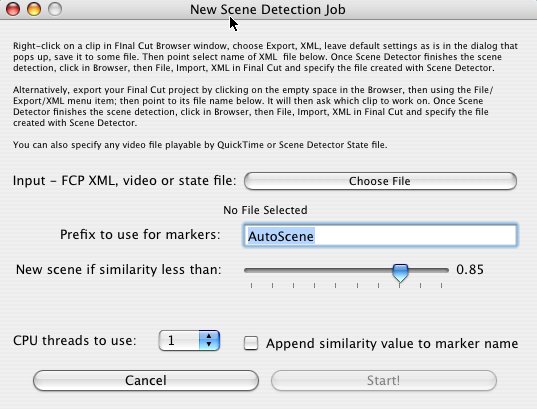
Here's an interesting app. Scene Detector is a utility that will analyze your footage and place markers where there are scene changes. It works by comparing frames evidently and there is a threshold slider to determine the amount of difference required for it to judge a scene has changed.

I haven't tried it but it sounds interesting.

MyBook vs. Blank Media


If you've been having trouble getting the Finder to recognize blank discs (not iPhoto or iTunes) and have a MyBook Pro II and installed it's silly software here's the solution:

Find a file called "com.WD.WDDriveServices.plist" and trash it.

Restart.

If you have trouble locating it (not sure about Leopard vs Tiger here) look in /library/LaunchDaemons/.