
Tuesday, October 6, 2009
Should People Wait to Buy FCS3?
Hardmac is reporting a rumor that one of their sources claims Final Cut Studio 3 is a "temporary/transition" version mainly released for Snow Leopard compatibility and that at NAB in 2010 (April 10th through the 15th) a more complete version will be announced.


Friday, October 2, 2009
What Model Mac Are You On?
If you're troubleshooting a Mac and aren't sure what exact model it is...so you don't know what firmware this or that needs...there's an easy way to find out not only the model designation but the type of CPU as well.
Fire up the Terminal (From the Finder hit Command + Shift + U, then T, then Command + O) and type in:
sysctl -a hw
Then hit Return.
You'll see fun info like:
hw.activecpu: 2
hw.physicalcpu: 2
hw.physicalcpu_max: 2
hw.logicalcpu: 2
hw.logicalcpu_max: 2
hw.cputype: 7
hw.cpusubtype: 4
hw.cpu64bit_capable: 1
hw.availcpu = 2
hw.machine = i386
but most importantly:
hw.model = Macmini2,1
If you want to see the exact CPU type, type in:
sysctl -a
and hit Return then look for something like:
machdep.cpu.vendor: GenuineIntel
machdep.cpu.brand_string: Intel(R) Core(TM)2 CPU T7200 @ 2.00GHz
Fire up the Terminal (From the Finder hit Command + Shift + U, then T, then Command + O) and type in:
sysctl -a hw
Then hit Return.
You'll see fun info like:
hw.activecpu: 2
hw.physicalcpu: 2
hw.physicalcpu_max: 2
hw.logicalcpu: 2
hw.logicalcpu_max: 2
hw.cputype: 7
hw.cpusubtype: 4
hw.cpu64bit_capable: 1
hw.availcpu = 2
hw.machine = i386
but most importantly:
hw.model = Macmini2,1
If you want to see the exact CPU type, type in:
sysctl -a
and hit Return then look for something like:
machdep.cpu.vendor: GenuineIntel
machdep.cpu.brand_string: Intel(R) Core(TM)2 CPU T7200 @ 2.00GHz
QuickTimeMPEG2 Component vs Snow Leopard

If you install Snow Leopard and have the QuickTime Mpeg2 component installed, Snow Leopard will likely delete it. So, before you install Snow Leopard back this file up:
/System/Library/QuickTime/QuickTimeMPEG2.component
If you have already installed Snow Leopard and are now missing this file there are three things you can do to get it back:
01) Go to your Time Machine backup and restore it.
02) Head over to Apple and see if you can download it again if you bought it there under your account in Downloadables.
03) If you initially got it via Final Cut Studio then pop your FCS Install disc back in and then in the Finder hit Command + Shift + G (for Go to Folder...) and head to /Volumes/Final Cut Studio/Installer/Packages. Look for QuickTimeMPEG2.pkg and install it.
And this is curious, if you Right Click on the QuickTimeMPEG2 Component in Snow Leopard and choose Open With... you'll see the odd option KoreanIM as the default. If you try to open it with KoreanIM you'll be greeted with "Hangul cannot open files of this type."
Fun stuff.
Thursday, October 1, 2009
Final Cut Pro 7 Professional Formats and Workflows

If you haven't yet grabbed a copy of Apple's 132 page Final Cut Pro 7 Professional Formats and Workflows PDF, you should. There is a mountain of useful information in it.
Quicktime Player Launcher preventing always "Open With" QuickTime Player 7
Try this in Snow Leopard:
01) Get Info on a typical .mov file.
02) Set "Open With" to QuickTime Player 7. (which will be in your utilities folder...)
03) Hit "Change All".
04) Watch the Open With pulldown magically change to QuickTime Player Launcher...which will launch QuickTime Player (X)...sigh.
What is QuickTime Player Launcher? It's an application INSIDE the QuickTime Player 7 app. Right Click on it so Show Package Contents to see it. Then if you want, do that again on QuickTime Player Launcher itself.
What does it do? I have no idea other than seemingly prevent a Snow Leopard user from opening their movie files in something other than QuickTime Player (aka QuickTime X). Seems a little heavy-handed to me coming from Apple.
Here is a thread about it:
Setting .mov files to play in QuickTime Player 7
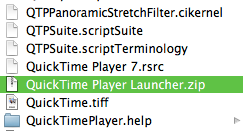
There is a workaround but I have no idea how "safe" it is.
01) Right-Click on QuickTime Player 7 in your Utilities folder and Show Package Contents
02) Goto Contents>Resources and locate "QuickTime Player Launcher".
03) Right-Click on it and select Compress "QuickTime Player Launcher". The resultant .zip file may appear on your desktop because you probably don't have Write permissions to this folder. Just drag it into the folder and Authenticate when it asks you to.
04) Drag (or highlight and Command + Delete) the original QuickTime Player Launcher to the trash. Authenticate if needed.
05) Empty the trash. (Command + Shift + Option + Delete)
Now, Get Info on a .mov (or whichever) file and tell it to Open With QuickTime Player 7 and Change All and then all of those files types should (so far for me) open with QT7.
The only issue you may see are some messed up QT icons in the Finder, either blank or the generic Unix app icon. Possibly because the OS thinks QT now has an unregistered extension.
I'll update this post if any weirdness happens.
01) Get Info on a typical .mov file.
02) Set "Open With" to QuickTime Player 7. (which will be in your utilities folder...)
03) Hit "Change All".
04) Watch the Open With pulldown magically change to QuickTime Player Launcher...which will launch QuickTime Player (X)...sigh.
What is QuickTime Player Launcher? It's an application INSIDE the QuickTime Player 7 app. Right Click on it so Show Package Contents to see it. Then if you want, do that again on QuickTime Player Launcher itself.
What does it do? I have no idea other than seemingly prevent a Snow Leopard user from opening their movie files in something other than QuickTime Player (aka QuickTime X). Seems a little heavy-handed to me coming from Apple.
Here is a thread about it:
Setting .mov files to play in QuickTime Player 7

There is a workaround but I have no idea how "safe" it is.
01) Right-Click on QuickTime Player 7 in your Utilities folder and Show Package Contents
02) Goto Contents>Resources and locate "QuickTime Player Launcher".
03) Right-Click on it and select Compress "QuickTime Player Launcher". The resultant .zip file may appear on your desktop because you probably don't have Write permissions to this folder. Just drag it into the folder and Authenticate when it asks you to.
04) Drag (or highlight and Command + Delete) the original QuickTime Player Launcher to the trash. Authenticate if needed.
05) Empty the trash. (Command + Shift + Option + Delete)
Now, Get Info on a .mov (or whichever) file and tell it to Open With QuickTime Player 7 and Change All and then all of those files types should (so far for me) open with QT7.
The only issue you may see are some messed up QT icons in the Finder, either blank or the generic Unix app icon. Possibly because the OS thinks QT now has an unregistered extension.
I'll update this post if any weirdness happens.
Friday, September 25, 2009
Toast Video Player

Just a quick note when trying to play some troublesome files, mainly older ones like SVCDs (mpgv) and so forth which may crash both QT7 and MPEG Streamclip and VLC likes to display scrambled and green; you may have a "hidden" video player (and converter) for these files with Toast. I'm not a huge fan of Toast overall but it has a handful of things that are helpful.
Go to your Toast icon, right click on it and select Show Package Contents then navigate to Contents>Resources>Toast Video Player and drag it to your Dock.
Bonus video player.
Also, don't forget that usually whatever Toast Video Player can play, Toast can convert to something useful.
XMLEditor for FCP XML Exports

XMLEditor is an interesting way to look at your XML exports (or one a client sends you). It's free and can actually help with some troublesome FCP XML saves if you know what you're doing.
Thursday, September 24, 2009
Speeds of Bad Firewire Cards
I thought the difference in speed between an iffy PCI FW card on an emailer's G5 and the built-in FW800 using the same hard drives and same cables was intersting. It's the difference between a 3+hour copy and a 22min one. I'm not sure what the cause is as they're still trying to troubleshoot it.
Good Speed:

Bad Speed:

Good Speed:

Bad Speed:

Wednesday, September 23, 2009
Quickly Preview High Playback Quality frames in Multiclip
Here's a quickie.
When you're editing a multiclip sequence and have RT set to Low or something other than High and you want to check the focus of a shot or something that requires seeing it at High Quality, simply tap Control + Z to toggle Excess Luma on and off. When it's on -and you see the green check mark or yellow exclamation point- you'll be viewing that frame in High quality.
Unfortunately, it won't stay high quality for playback if you have RT set to something like Low Quality playback.
When you're editing a multiclip sequence and have RT set to Low or something other than High and you want to check the focus of a shot or something that requires seeing it at High Quality, simply tap Control + Z to toggle Excess Luma on and off. When it's on -and you see the green check mark or yellow exclamation point- you'll be viewing that frame in High quality.
Unfortunately, it won't stay high quality for playback if you have RT set to something like Low Quality playback.
Tuesday, September 22, 2009
Snow Leopard and Firewire Problems
From xlr8yourmac.com: (there's no direct link to the posting, sorry)
I haven't seen any issues with 10.6 and Firewire yet but could be helpful for someone.
Reader's workaround for Snow Leopard Firewire problems - My main work machine is still running 10.5.8, but have 10.6.1 running on other Macs and I've not seen any FW issues like this so far, but only used a FW HD dock with them once. (As far as external drives, I've primarily been using an eSATA JMB360 Expresscard connected eSATA HD dock with the 10.6.1 MBP.)
" Firewire and Snow Leopard
Since installing Snow Leopard I had problems with two Firewire DVD burners, one would not mount disks and the other exhibited read problems. They worked fine when connected by way of USB and had worked fine under Leopard. My Firewire hard drives worked OK, although others have had the problem with hard drives as well.
The problem is with a Firewire extension in Snow Leopard IOFirewireSerialBusProtocolTransport.kext
Replacing it with the extension from 10.5 seems to solve the problem. (but does that work w/64bit kernel boots?)
Some people have replaced all five Firewire extensions with those from 10.5. Results have been mixed. For some it is successful, for others the thing that works is replacing only the one extension.
One caveat. Be sure to repair permissions BEFORE restarting. If you don't, for some reason the replacement extension(s) may not be recognized despite repairing permissions after a restart and then restarting again.If this occurs you would have to repeat the entire process.
-Ken"
I haven't seen any issues with 10.6 and Firewire yet but could be helpful for someone.
Subscribe to:
Posts (Atom)


 Posts
Posts

