
I don't use it but it does offer some interesting features.
The $60 (single license) FCP Versioner saves projects as XML files* (which FCP already can do, so I'm not sure of the benefits there) but it also provides a change log between saved versions of a project (which can be handy if you're not already familiar with XML, diff and the terminal) and allows for greater flexibility of number of saves per some length of time. I like autosaving every 15 mins so after an 8 hour day you have 32 saves with only 15mins of work between them. For longer projects or when they're closer to completion I usually change that to about one every hour.
There is a 15 day trial here.
*FCP Versioner's Autosave requires FCP7.
Friday, December 25, 2009


Thursday, December 24, 2009
Remove the U3 partition on USB SanDisk flash drives
I use flash drives for quick, cheap and small backups of FCP save files. I use Dropbox but when the client doesn't have an internet connection or it'll take too long to download 800MBs of save files I like to use a flash drive.
But, on some SanDisk flash drives they have this annoying U3 partition that seems impossible to get rid of.
Here are two links about how to remove that partition on a Mac.
Link 01
Link 02
But, on some SanDisk flash drives they have this annoying U3 partition that seems impossible to get rid of.
Here are two links about how to remove that partition on a Mac.
Link 01
Link 02
Wednesday, December 23, 2009
Final Cut Pro 6.x + Snow Leopard means your gamma is wrong

FCP's Viewer vs. Quicktime Player 7
If you use FCP 6.x and Snow Leopard your Gamma onscreen in the Canvas and Viewer is likely wrong. Here's some more info about it.
FCP corrects for viewing at 2.2 gamma, so when you're using Leopard or earlier which has 1.8 gamma everything is okay. But, since Snow Leopard defaults to 2.2 gamma, FCP is over correcting the gamma.
If you have FCP 6.x and Snow Leopard check it out yourself. Open up a file in FCP, then also open it in QT 7 and compare the images. Toggle "Enable FCP compatibility" in QT Player 7 as well. Compare the gamma of the images.
Bottom line, if at all possible correct your work on a broadcast/production monitor or just burn off a DVD and pop it into your player and take a look at it.
Conversely, you may see a similar issue with FCP7 and Leopard.
If you don't do anything else, at least learn to use the Vectorscope and Waveform Monitor and correct using those.
Viewing small movies at correct size in Quicktime X
I really really really don't like Quicktime X.
Here's a rather unusual tip to view small movies at their correct size since QTX resizes and scales up smaller movies.
"To quickly view a movie without this restriction, I drag it into a new mail message. The player used in Mail has the old-style controller at the bottom, and plays the movies at the correct size."
It may be further evidence that QTX is just window dressing to the old standard QT core technology that's been around for a while now.
Here's a rather unusual tip to view small movies at their correct size since QTX resizes and scales up smaller movies.
"To quickly view a movie without this restriction, I drag it into a new mail message. The player used in Mail has the old-style controller at the bottom, and plays the movies at the correct size."
It may be further evidence that QTX is just window dressing to the old standard QT core technology that's been around for a while now.
Thursday, December 17, 2009
VLC for Mac Losing Developers

VLC for the Mac may be dead due to lack of active developers.
If you can help out or know someone that can, head over to their developer page.
by Rémi Denis-Courmont on Sun Dec 06, 2009 11:00 pm
There are now effectively zero active developers for MacOS.
As an immediate consequence, the 64-bits releases for MacOS has already been put on hold.
I don't need to mention the stale status of the MacOS user interface.
If it goes on like this, MacOS support may be discontinued as of VLC 1.1.0. There is nobody to make the necessary updates to the MacOS support code, for instance to support the new VLC video output architecture.
Taking into account the learning curve to VLC development, I think it is fair to say that the situation is now critical.
Monday, December 14, 2009
Microsoft Abandons Indeo Codec
Microsoft has decided to disable a 17-year-old video codec in older versions of Windows rather than patch multiple vulnerabilities, according to the company's security team.
The update targets only the oldest editions of Microsoft's operating system: Windows 2000, Windows XP and Windows Server 2003. Windows Vista, Windows 7 and Windows Server 2008 already bar the Indeo codec from loading. Intel introduced the codec in 1992.
You can read the article here. I'm sure that at some point, with some client this will be an issue.
Sunday, December 13, 2009
Western Digital's Advanced Format for HDs
Western Digital has something called "Advanced Format" for hard drives that increases their usable space anywhere from 7 to 11%. You can read about it here. Looks like it's transparently compatible with OS X.
I guess it's another way to keep increasing HD space while skirting the issue of superparamagnetism.
I guess it's another way to keep increasing HD space while skirting the issue of superparamagnetism.
Shoot Underwater on the Cheap
I don't have an iPod nano 5G that does video so I can't test this out but a company called H2O Audio has an underwater case for the iPod Nano 5G which lets you shoot video underwater.
The iPod Nano 5G lets you shoot 640x480 30fps in H.264 but at $79.99 if you already have a 5G nano this could be a cheap way to get some underwater shots for youtube videos and what not.
A company called DryCase makes one for the iPhone (which I can't test either since I still don't have an iPhone) or any electronic device which costs only $40 or so and is vacuum-sealed with a headphone jack on the outside.
As a kid I'd wrap my 8mm Video camera in Saran Wrap and jump into the pool with it which was cheaper but considerably more adventurous.
Or you can just do this:
The iPod Nano 5G lets you shoot 640x480 30fps in H.264 but at $79.99 if you already have a 5G nano this could be a cheap way to get some underwater shots for youtube videos and what not.
A company called DryCase makes one for the iPhone (which I can't test either since I still don't have an iPhone) or any electronic device which costs only $40 or so and is vacuum-sealed with a headphone jack on the outside.
As a kid I'd wrap my 8mm Video camera in Saran Wrap and jump into the pool with it which was cheaper but considerably more adventurous.
Or you can just do this:
Audio Waveforms Only Display When Zoomed
In FCP 6.0.6 I've mentioned the audio waveform display bug before, but here's a new twist to an old problem.
In the Timeline one set of audio will display the waveform while another one won't. They're identical as far as I can see and in fact, were recorded at the same time only on two separate yet identical cameras.
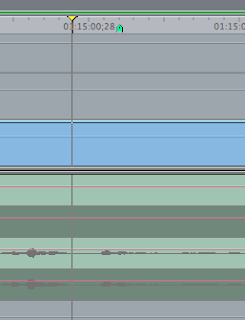
That's what it looks like in the Timeline. The upper channels are flatlined, but if you load that audio clip into the Viewer you'll see something like this:
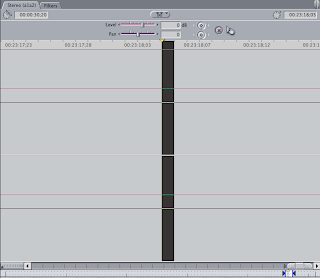
Now, if you zoom in one more iteration you'll see the waveform:
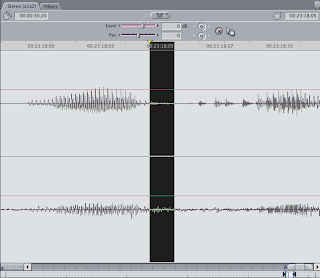
Most of the time quitting and relaunching FCP (6.0.6) will clear this up but not always. Trashing the waveform cache can help as well but it's not a 100% guaranteed fix.
In the Timeline one set of audio will display the waveform while another one won't. They're identical as far as I can see and in fact, were recorded at the same time only on two separate yet identical cameras.

That's what it looks like in the Timeline. The upper channels are flatlined, but if you load that audio clip into the Viewer you'll see something like this:

Now, if you zoom in one more iteration you'll see the waveform:

Most of the time quitting and relaunching FCP (6.0.6) will clear this up but not always. Trashing the waveform cache can help as well but it's not a 100% guaranteed fix.
AUgraphicEQ's Battle of the Bands

I've never been able to get the AUgraphicEQ audio filter's 10 Band setting to work. It's either a bug or something I'm unaware of. When I set the pull-down to 10 Bands nothing changes...the sliders aren't reduced in number nor are they linked so it's effectively only 10 bands.
I have heard from some others that it works in other applications but not using those apps I have no idea really. It may just be a filter in those apps with the same name. In FCP, the 10 band setting seems to have no effect.
QUICK TIP: While playing back an edit and having this or other filters active, you can use a mouse like the Mighty Mouse to adjust the sliders in real time during playback when normally it would stop if you click and drag on a slider. Just position the cursor over a slider and use your scroll wheel/ball...just don't click or playback will likely stop.
Subscribe to:
Posts (Atom)


 Posts
Posts

